Friday, July 22, 2011

Have you seeing this Autodesk Site Before???

Hi there... Autodesk has a new support site for all of us.... It's call Autodesk - WikiHelp ...
Go ahead and check it out, they have a tons of information and it is product related...
Have a great searching experience.... and let them know what you think about it...

Friday, July 1, 2011

AutoCAD Civil 3D 2011 Update 2... Is Out!!!

Hi everybody... In a continuing effort to provide high quality products, Autodesk has released AutoCAD Civil 3D 2011 Update 2, which fixes or addresses a variety of issues discovered by customers and by Autodesk's internal testing team.
AutoCAD Civil 3D 2011 Update 2 contains the fixes included in AutoCAD 2011 Update 2 and AutoCAD Map 3D 2011 Update 2.
You MUST first have AutoCAD Civil 3D 2011 Update 1 installed prior to installing this update.

Thursday, June 23, 2011

How to get your AutoCAD Menus back in AutoCAD Architecture...

Hi everybody.... I know that this is not a Civil 3D post, but I have been asked this questions so many times lately that I decide to do a post about it....
As probably all of you know by now when Autodesk introduced the Ribbons in 2010 for every single Autodesk product, your Menus in AutoCAD Architecture (ADT or ACA) are no longer loaded by default, and if you being working with ADT since before, you also know that the ACA.cuix and the ACAD.cuix don't play well together, but we can make it work just doing a couple of steeps...
Please take a look at the video and if you have any question feel free to drop me a line...


Hope this will help... have a good one...

Tuesday, June 7, 2011

Binding a Raster Image in AutoCAD...

Hi again... After a really quiet time, I am back... I being ask lately about How to Bind a Raster Image in AutoCAD, as you probably already know raster images can only be referenced into AutoCAD drawings. If you send the drawing to someone else, you must send the image file also, if you will end up with a broken reference.
One way to get it done is inserting the image as an OLE object.
Go to the Insert Tab and look for OLE Object or just type INSERTOBJ on the command line.
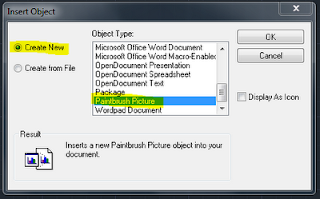
Choose "Create New", then choose "Paintbrush Picture".
Next, Windows Paintbrush should open up.
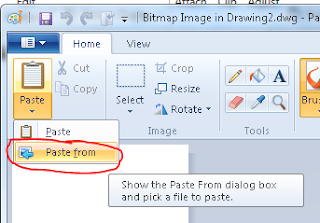
In Paintbrush, choose the from the ribbons -> Paste, then Paste from...
Select your existing image file (JPG, BMP, PNG, TIF, etc.)
Close Paint and save your AutoCAD drawing...
Hope this will give you some ideas and help you somehow...

Tuesday, April 5, 2011

CONFIGURING NETWORK LIC UNDER IP GROUPINGS WITH DIFFERENT SUBNETS THROUGH A ROUTER WHEN SERVER NAME IS NOT RECOGNICED

Hi there.... This is one of those really weird cases, those that you rum into something completely different that a regular Network Lic setup, This is from one of our Central American Customers for our partner company Down To Earth Technologies, they are an Autodesk Authorized Distributor for Central America and the Caribbean. The situation was a fallow, the customer wanted to install 25 Network License without having a fisical server setup.... everything was done through a router, not mapping drives at all, and they wanted to use an IP address to access the License Manager, which represent quiet a challenge, for the way that the LM Tools work, the Deployment wasn't able to access the information and it was rolling back...
This is how we were able to make it work...
Go to ...

C:\Windows\System32\drivers\etc\hosts
- Open with note pad the hosts file
- Add to the list, the IP address (TAB) server name save ... it should look some like this...
- Also add system variable ACADSERVER = server name
That should do it...It worked fro us... Hope this will give you some ideas, to work around your problems... Courtesy of James Cuervo, DTE Autodesk License Compliance Specialist

Thursday, March 24, 2011

Civil 3D 2011 Installation problem!!!

Hi there... I being really active lately, well this time is about a problem that I faced with one of our customer.... He wasn't able to install his AutoCAD Civil 3d 2011 on his office workstations with Windows 7 Professional 64Bit....
The installation wizard was giving him the following errors, and the installations was failing...
How I work around it was like this...
- Have the administrator try running the installation.
- Disconnect the mapped drive.
- Use the SUBST command from an MS-DOS prompt to map the invalid drive to the temp folder on drive C. (Start -> RUN -> subst U: c:\temp)
For example, to map an invalid drive T to the temp folder on drive C, enter subst U: c:\temp at the MS-DOS prompt.
Run the installation back again, pay attention and check your setting just to double check that in effect you are installing the software in your C drive, and when it finish, please remember to delete the invalid drive.
- To delete the mapping, enter subst U: /d at the MS-DOS prompt.(Start -> RUN -> subst U: /d)
Hope this can help you in case that you run into some like this!!!!

Wednesday, March 23, 2011

Release Comparison Matrix for AutoCAD Civil 3D!!!

.... Yes is that time of the year again, Autodesk is getting ready to release the 2012 products, so here is a Comparison Matrix for AutoCAD Civil 3D 2010 - 2011 and 2012, where you can see all the Supported Features, Enhanced Features and New Features added by Autodesk to Civil 3D in every release....
Release Comparison Matrix for AutoCAD Civil 3D
@Civil3DBTF